Using MSP SET AUX RC#
Overview#
INAV later than 9.0.1 provides MSP2_INAV_SET_AUX_RC, a well intended but possibly dangerous means to set RC channels using a "fire and forget" pattern. This API breaks long standing INAV semantics regarding minimum update rates for RC links and requires the user to "make safe" rather than having a device "fail safe".
- Notwithstanding these concerns, mwp supports
MSP2_INAV_SET_AUX_RC. This requires that the INAV version is > 9.0.1 (or the user sets the environment variableMWP_FORCE_INAV_91(to anything) , (i.e. $MWP_FORCE_INAV_91=1 mwp, or addMWP_FORCE_INAV_91=1to~/.config/mwp/cmdopts). - mwp attempts to "make safe" where possible.
- mwp currently provides a "Virtual Switch" capability using discrete mode ranges. Should there be a user requirement, this could be expanded in the future to provide a "Virtual Dial" or "Virtual Slider" allowing full range (1000 - 2000µs) virtual channels e.g. for camera pan / tilt.
Usage (Setup)#
- The SET AUX RC setup dialog is accessed from the Edit > AUX RC Modes Configuration option.
- mwp provides a setup dialog to assign channels to modes. Transient mode ranges are constructed, and if they do not exist in the FC, are sent to the FC. When the mode ranges are sent to the FC, the used channels are set to 985µs to avoid surprises.
- Channels are assigned in the range 21-32 (12 available channels). In future, this channel rnage could be user defined. Currently mwp does not de-conflict extant FC mode ranges (this is technically possible, should there be such a requirement. For now, it is a user responsibility.
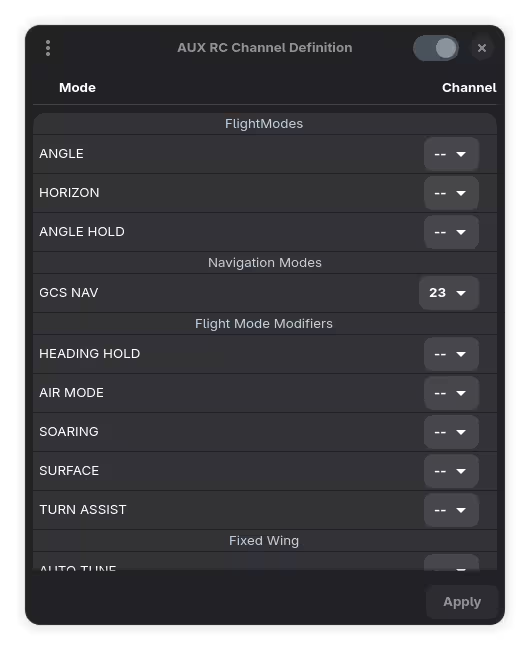
- The "Switch" widget in the header bar shows / hides modes set the FC
- The Apply button sets any non-extant mode ranges in the FC. It also causes the used channels to be set to 985µs to avoid surprises.
- The menu provides:
- Restore : restores settings saved with Backup
- Backup : generates a backup of the current settings (
~/.config/mwp/aux_rc/defaults).
- The Apply button's sensitivity depends on the state of the MSP connection.
- When mwp generates ephemeral mode ranges, these start at 1000µs and are 50µs wide, monotonically increasing, contiguous.
- Default mode ranges (from Backup) may be loaded and applied automatically when a serial device is opened, according to the
auxrc-initGsetting.
Usage (Virtual Switch)#
Once the ephemeral mode ranges have been generated, they can be actioned by the Edit > In flight modifiers > AUX RC Virtual Switches option. This presents a dialog to action the previously defined modes.
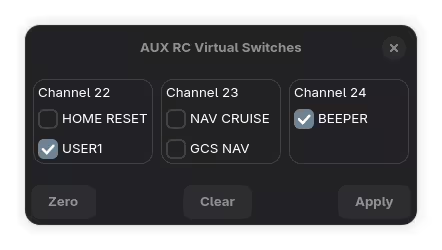
- Apply : Sends data to the FC. Any empty channels are set to 985µs.
- Clear : Clears all buttons and sets all defined channels to 985µs.
- Zero : Clears all buttons and sets all defined channels to 0µs.
Automation#
mwp's "set aux rc" functionally can be automated to load and apply saved defaults using the auxrc-init Gsetting.
none: No automation is performed (default)load: Saved (default) Aux RC settings are loaded at startup such that they appear in the setup dialog.load-set: Saved (default) Aux RC settings are loaded at startup and applied (sent to the FC) when a MSP serial channel is started.